Better Virtual Meetings Start with a Pro Setup: Try These 8 Tips

Even if your teams have returned to the office, I’m guessing virtual meetings are still a significant aspect of group collaboration and communication. Sometimes it’s still the best way to gather a distributed team for productive collaboration! Leading through screens is hard work, but getting your tech set-up right is going to make the process infinitely smoother and, more importantly, lead to better results.
Over the past six years of facilitating virtual sessions, I’ve learned something important: the quality of a virtual workshop often starts with your setup.
When you’re running a virtual session—especially if you’re doing it solo—you’re likely thinking about holding the room, guiding decisions, and keeping people engaged across screens and time zones. It’s not about nailing a Pinterest aesthetic—it’s about having the right tools to lead smoothly and confidently.
Here are eight pro-tips that make a huge difference.
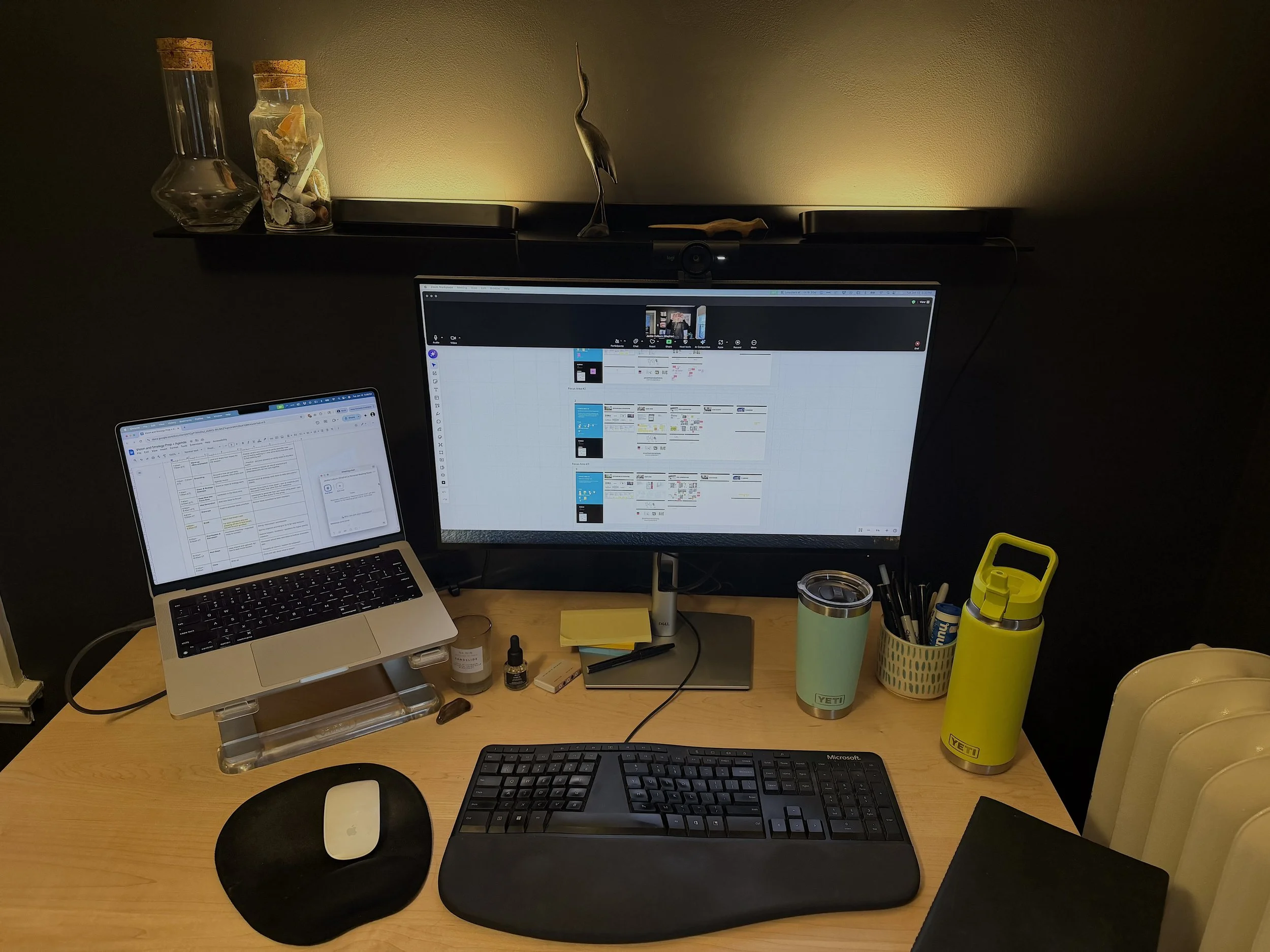
1. Dual monitors are a must
When you only have one screen, you’re constantly toggling between:
The collaboration board
Participant reactions
The group chat
An agenda
That friction pulls your attention away from the group.
With two monitors, you can do a better job of staying present while also quietly managing the flow behind the scenes.
I keep my virtual collaboration tool, like Miro, on the big screen, with the agenda and chat on the second screen.
This might seem like a small thing, but it changes everything.
2. Keep participants’ faces visible
In a physical space, you can naturally read the room. But virtual facilitation requires us to recreate that awareness intentionally.
That’s why I put the toolbar with participant faces at the top of my big monitor, right above the Miro board.
This will help you:
Read reactions and body language
See when someone wants to jump in
Notice confusion or hesitation
Seeing faces helps you maintain something close to virtual eye contact, which keeps participants engaged and reminds them they’re part of a real conversation, not just another meeting window.
3. Hide self-view if it distracts you
Watching yourself can pull your attention into performance mode instead of curiosity mode (more on that, here).
Your job is to guide the conversation, not critique your own facial expressions.
Personally, I usually hide my self-view because I feel like it ends up being a distraction and is not helpful for fostering connection and engagement.
4. Use Post-it notes, even during virtual sessions
When you’re leading a virtual meeting or workshop, you’re juggling listening with synthesizing, and guiding with capturing. It’s a lot!
One thing that can help with this is to use a stack of physical Post-its to:
Quickly capture ideas or themes while participants are talking
Read them back to the group
Confirm alignment
Transfer ideas onto the Miro board
It’s a simple way to stay mentally organized while conversations move quickly.
5. Keep a few things nearby that help regulate your energy
Facilitating a workshop—even a virtual one—takes real energy.
I keep a few small things nearby that help me stay centered, like a nice-smelling candle, or a cool stone I can hold during intense discussions.
This might sound a little unconventional, but good facilitation is about managing the room’s energy. And that starts with managing your own.
When you’re calm and grounded, the group usually follows.
6. Lighting matters more than you think
Natural light is great, but it doesn’t always work with desk placement.
Good lighting helps in a few ways:
Participants can clearly see your expressions
You look more present and engaged
The overall session feels more professional
When your setup looks thoughtful, participants subconsciously feel that the session itself will be thoughtful too.
Pro tip: I use Hue lights above and in front of my desk so I can tweak the lighting depending on the time of day.
7. An external camera can make a big difference
Being able to position the camera exactly where it works best helps create a more natural conversational angle instead of the classic laptop “looking down at you” view.
Right now, I’m using a Logitech MX Brio. The biggest benefit isn’t just image quality, it’s camera placement.
Again, it’s a small detail that improves human connection through the screen.
8. Keep your beverages handy
This sounds minor, but it prevents those awkward moments where you have to pause the session to get up or reset.
I keep my hydration station on the right so it’s easy to sip coffee or water without interrupting the flow of conversation.
Small logistics matter when you’re facilitating a room of people whose calendars are tightly packed.
Good facilitation is often about creating more ease and preventing tiny disruptions before they happen.
Why a Solid Setup Is Worth It
You might wonder if all this setup is overkill.
But here’s the reality: virtual collaboration already starts with a disadvantage compared to being in the same room.
People are distracted. Attention is fragmented. Energy is harder to maintain.
A strong facilitation setup helps close that gap and allows you to:
Read the room more effectively
Guide discussions without fumbling with tools
Maintain credibility and presence
Respect everyone’s time
It’s about creating the conditions for clear thinking, productive collaboration, and forward momentum.
And those outcomes are worth a little extra effort before the meeting starts.
One Final Thought
Wearing the leadership hat and the facilitator hat at the same time is HARD. Leadership requires judgment and direction. Facilitation requires neutrality and mechanics. When one person tackles both simultaneously, progress can suffer.
If your sessions feel heavy, unbalanced, or exhausting, it may be a role overload. Check out this post to see why this is so hard, and when you might want to bring in reinforcements.